

Table of Contents
SVBONY Gift Card Guide: Types, Rewards & How to Use Them
Discover the new SVBONY Gift Cards program. Explore 10 gift card types, rewards, points, and learn how to redeem and use your benefits.
SVBONY has launched its new Gift Cards program, bringing members more ways to enjoy rewards and benefits. From discount coupons and physical gifts to video courses, warranty services, and points, there's more to explore beyond regular shopping discounts.
Whether you earn gift cards through purchases, membership benefits, community activities, or points redemption, this guide will walk you through the 10 types of SVBONY Gift Cards, the rewards they offer, and how to redeem and use them.
Please note:Images in this guide are for illustrative purposes only. The points required to redeem gift cards may vary depending on the specific reward, promotional offer, and applicable redemption rules. Always check the latest details displayed in the Gift Cards Store before redeeming.
Explore the 10 Types of SVBONY Gift Cards
SVBONY offers 10 types of Gift Cards, each with different eligibility requirements, reward options, and ways to receive them. They fall into four main categories.
Unlock with Points
Use your points to redeem selected gift cards and enjoy additional benefits.
- Points-to-Gift Card: Exchange points for discount coupons or physical gifts.
- Warranty Extension: Redeem points for additional warranty coverage on eligible equipment.
- Master Class: Use points to access video courses and expand your astronomy knowledge.
Shopping & Product Rewards
Some eligible purchases come with additional gift card rewards.
- New Product Gift Card: Issued after payment for an eligible order has been successfully received.
- Customer Upgrade Gift Card: Issued after all items in an eligible order have been shipped.
Depending on the offer, rewards may include discount coupons, physical gifts, video courses, services, or points.
You can check eligible gift card offers on product pages, in your shopping cart, or in product listings before placing an order.
Please note: A displayed gift card offer means you may receive a reward after meeting the stated purchase conditions.
It doesn't mean the gift card has already been issued or can be used in the same order. If you select a different product option, check the offer again, as available rewards may vary.
Community & Membership Perks
Enjoy additional benefits through your participation in the SVBONY community and membership program.
- UGC Reward Gift Card: Submit your user-generated content (UGC) to receive rewards such as discount coupons, physical gifts, courses, or points.
- Member Gift Card: Receive exclusive rewards when you upgrade your SVBONY membership tier. Available benefits vary by membership level.
- Birthday Gift Card: Eligible members automatically receive 200 points as a birthday reward.
Customer Service & Special Rewards
Selected customers may receive special gift cards for service-related or customer retention purposes.
- Service Credit: Issued to designated customers for service recovery or compensation. Each customer can receive this card only once.
- Win-back Gift Card: A special incentive offered to selected customers to encourage them to return. Each customer can receive this card only once.
Note: Service Credit and Birthday Gift Cards are not displayed in the Gift Cards Store. Eligible recipients can find them under My Gift Cards.
What Rewards Can You Get?
The reward you receive depends on the gift card type and its specific terms. Common reward options include:
| Reward Type | Description |
|---|---|
| Discount Coupons | Get discounts on eligible purchases. Check the coupon details for applicable conditions. |
| Physical Gifts | Receive eligible products or other gifts specified in the reward details. |
| Video Courses | Access astronomy learning content through My Courses. |
| Services | Enjoy service-related benefits, such as warranty extensions and other designated services. |
| Points | Receive points in your account for future redemption. |
Before using a gift card, review its details to understand the specific reward, eligibility requirements, and validity period.
How to Browse, Redeem, and Use Gift Cards
You can manage your gift cards through your SVBONY account. Here's how to find, redeem, and use them.
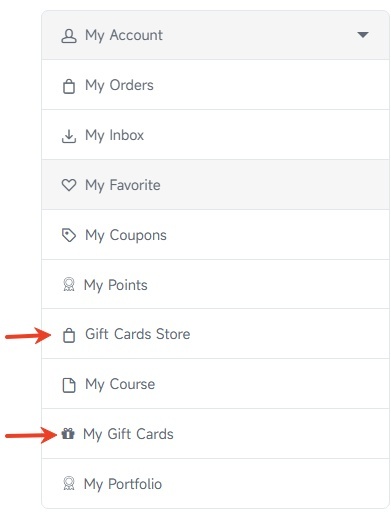
Step 1: Find Your Gift Cards
Sign in to your SVBONY account and click My Account. You'll find two relevant sections:
- Gift Cards Store: Browse gift cards available for redemption with points, including Points-to-Gift Card, Warranty Extension, and Master Class.
- My Gift Cards: View gift cards you've received directly from SVBONY or redeemed with points.
In the Gift Cards Store, you can search by keyword or filter by gift card type. Each listing displays the gift card name, type, validity period, and available actions.
Click the question mark (?) or Details to review the benefits and usage rules.
For points redemption cards, you'll also see the required number of points.
Under My Gift Cards, you can check the details and status of your received cards.
If a card has been used for an order, the associated order number may also be displayed for reference.
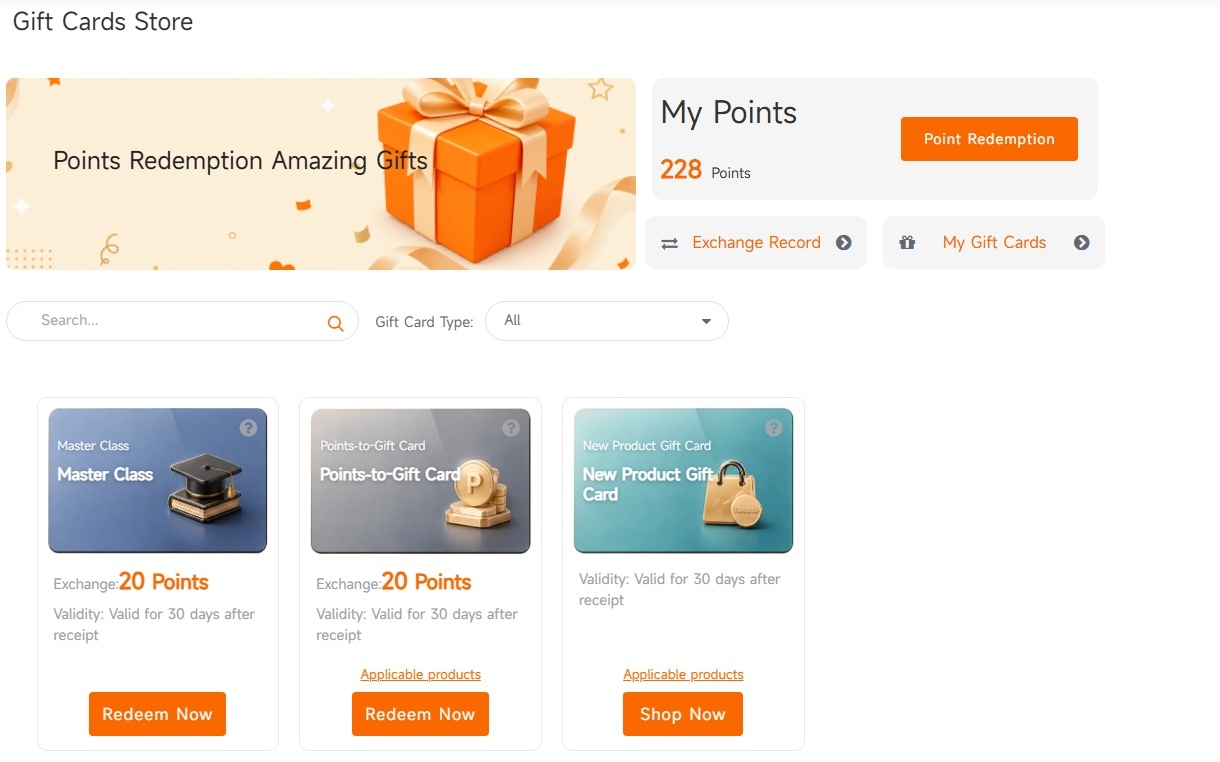
Step 2: Redeem Gift Cards with Points
Some gift cards can be redeemed directly with your points.
- Find an eligible gift card in the Gift Cards Store.
- Check the required points and review the reward details.
- Click Redeem and confirm your selection.
- Once redemption is successful, the gift card will appear under My Gift Cards.
A gift card may be unavailable for redemption if you don't have enough points, the redemption period hasn't started or has ended, or the available quota has been exhausted.
Want to make the most of your SVBONY Points? Check out SVBONY Points Guide to learn how to earn and use points for more rewards.
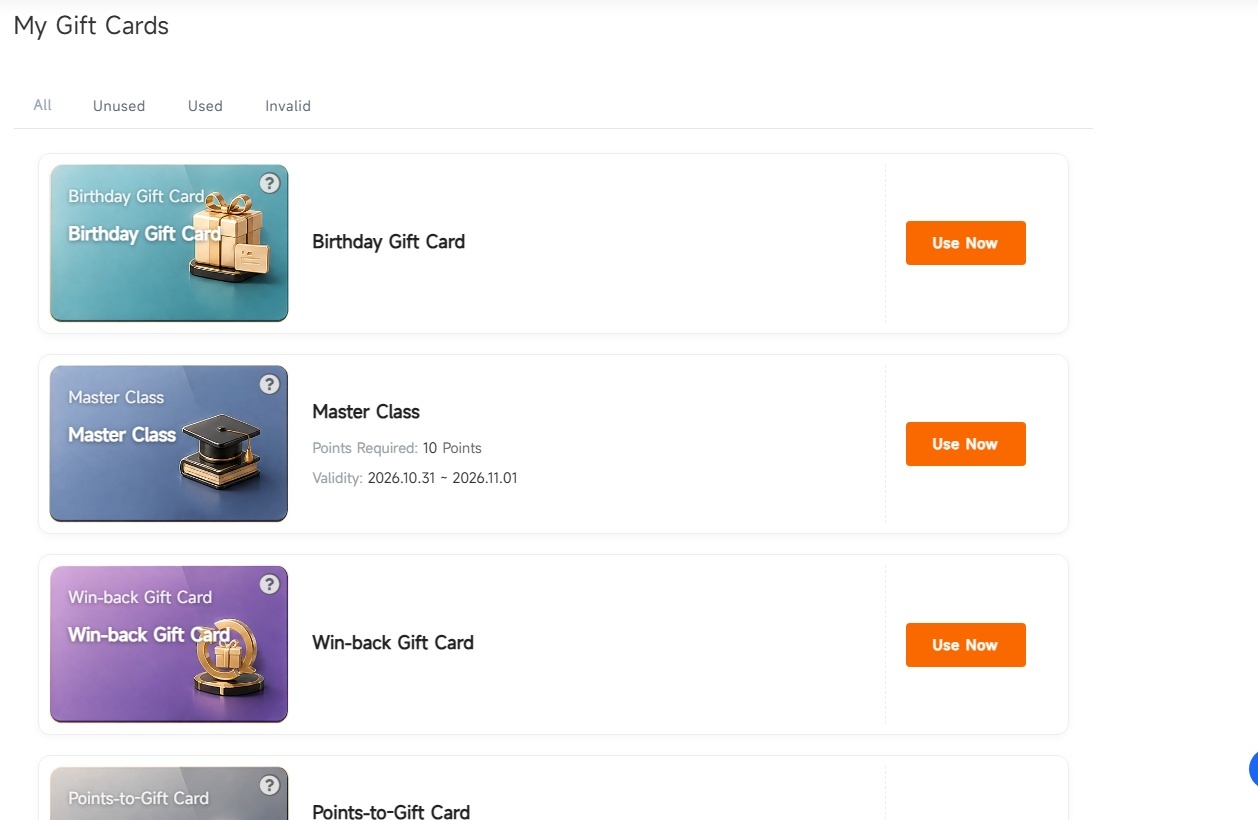
Step 3: Use Your Gift Cards
The way you use a gift card depends on its reward type. Follow these steps to access and use your rewards:
- Sign in to your SVBONY account and go to My Gift Cards.
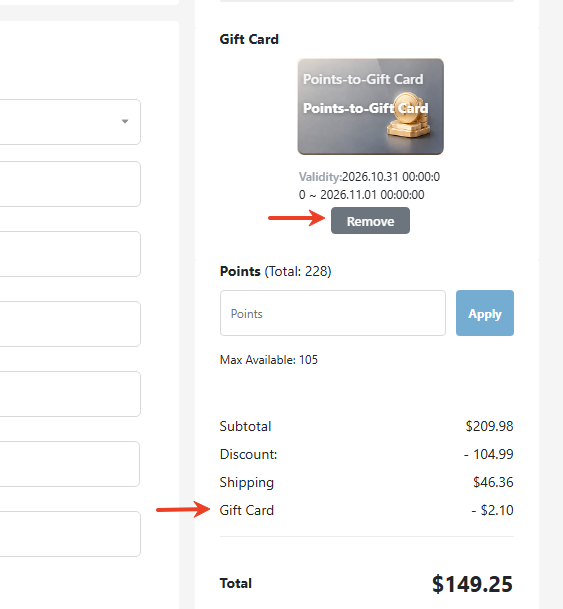
- Find the gift card you want to use, review its details and validity, then click Use. You'll be redirected to the relevant page based on the gift card type.
- For gift cards that can be applied to purchases or services, follow the instructions on the destination page:
- Discount Coupons: Check that the discount amount is applied correctly.
- Physical Gifts: Confirm the gift item, selected specifications, and any applicable shipping fees.
- Services: Review the eligible products and applicable service terms.
- You can cancel your selection and choose another available gift card where applicable.
- Review the relevant details and complete the required steps. For gift cards used in an order, the system will recheck card ownership, validity, stock, and usage conditions when creating the order.
Important: Each order can use only one gift card. Selecting a gift card doesn't complete its use. For order-related rewards, the card is recorded as used only after the order is successfully created.
Other Reward Types
Some gift cards provide rewards through other account sections:
- Video Courses: Access your learning content through My Courses.
- Points: Points are credited to your account when the gift card is issued. Check your account points balance to view them.

Good to Know Before You Checkout
A few additional details can help you avoid confusion when managing your gift cards.
Where to Find Your Gift Cards
Some gift cards are available for points redemption, while others are issued directly by SVBONY.
Service Credit and Birthday Gift Cards aren't listed in the Gift Cards Store.
Gift cards that have been fully redeemed are no longer displayed in the Gift Cards Store.
Removing a gift card from the Gift Cards Store doesn't cancel benefits you already hold. You can still check received cards under My Gift Cards.
What Happens If I Cancel an Order?
If an order is canceled after a gift card has been redeemed for it, the gift card will return to an unused state.
However, keep these conditions in mind:
The original expiration date still applies.
Points used to obtain the gift card won't be refunded.
The card's availability for reuse depends on its validity and current usage conditions.
The original expiration date won't be extended.
Payment Status & Conflicts
If the payment result for an original order is received after the order has been canceled, the system may attempt to reserve the original gift card again.
If the card has already been used in another order or a conflict occurs, contact SVBONY Customer Service for an order and payment review.
Important: A returned gift card doesn't necessarily mean the original payment was unsuccessful. Check your order status before placing another order.
Explore Your SVBONY Gift Card Benefits
The new SVBONY Gift Cards program gives members more ways to enjoy rewards, whether through shopping, membership benefits, community participation, or points redemption.
For the latest gift card availability, reward details, and usage conditions, sign in to your SVBONY account and visit the Gift Cards Store or My Gift Cards.
Comments (0 )
Leave a Reply
 Google
 Amazon
There are no customer reviews yet . Leave a Reply !